
Table of Contents
How to Stay Organized Without a Traditional CRM
Organize real estate clients using email, spreadsheets, calendar automation and AI—no costly CRM required.
How to Stay Organized Without a Traditional CRM
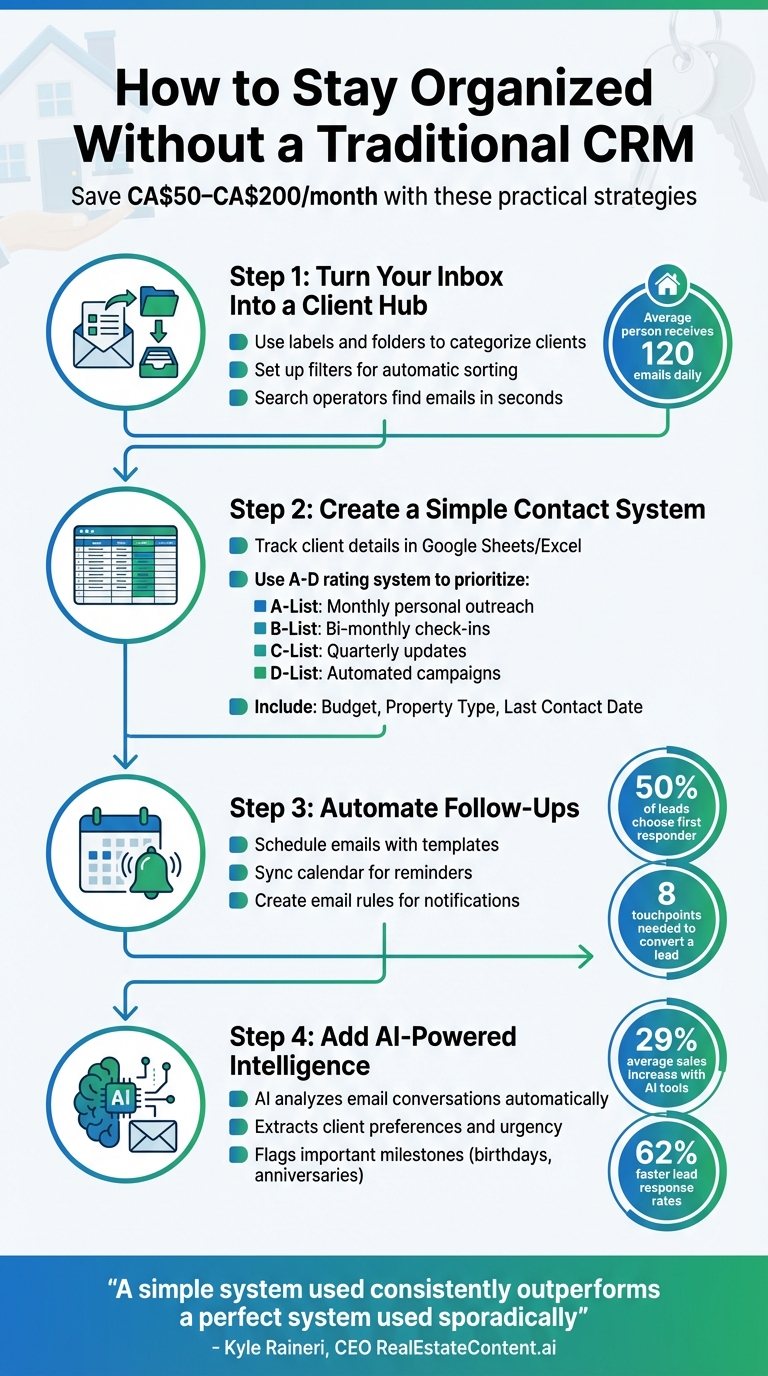
In real estate, staying organized is key to nurturing client relationships and driving referrals. Yet, many agents avoid using CRMs due to high costs (CA$50–CA$200 per month), complexity, and time-consuming data entry. Here's how you can streamline your workflow without relying on one:
- Use Your Inbox: Turn Gmail or Outlook into a client management tool with labels, folders, and filters. Automate email sorting and use search operators to find information quickly.
- Spreadsheets for Contacts: Track client details like names, budgets, and follow-up dates in Google Sheets or Excel. Use dropdown menus for consistency and prioritize clients with an A–D rating system.
- Automate Follow-Ups: Schedule emails, use templates, and sync your calendar for reminders. These tools help ensure timely responses and consistent communication.
- Leverage AI Tools: AI-powered tools like KivoAI can analyse email conversations, create client profiles, and suggest follow-ups, saving time on manual tasks.
These practical strategies simplify your workflow, reduce admin time, and help you focus on building strong client relationships.
Don’t Buy a CRM Yet! The FREE DIY CRM Every Startup Should Use
Turn Your Inbox Into a Client Organization System
You don’t need fancy software to keep your client communications organized - your email inbox can do the job just fine. With a few adjustments, you can turn it into a streamlined system that keeps all client details within reach. Considering the average person deals with about 120 emails daily 6, having a clear structure can save you hours of digging through messages.
Set Up Email Folders and Labels
Start by creating a system that mirrors the way you work. If you’re using Gmail, labels are a great alternative to traditional folders. Unlike folders, labels allow an email to belong to multiple categories simultaneously 78. For example, you could create a main "Clients" label and then add sub-labels for individual client names under it 712. For ongoing work, you might also want labels like "Under Contract", "Closed", and "Leads" 4.
To make things even easier, assign bright colours to your most important labels - like red for "Active Contracts" - so they stand out at a glance 6. Once a label is applied to an email, you can archive the message to clear it from your inbox while keeping it accessible under its category or in "All Mail" 712.
"Labels function just like folders, allowing you to group and store emails in categories of your choosing." - DeAnn Hawkins, Shaker 4
Save time by automating the process. In Gmail, click the down arrow in the search bar, input criteria like a client’s email address in the "From" field, and select "Create filter." Then, choose "Apply the label" to automatically tag emails from that client as they arrive 68.
Use Search and Filters to Find Information Fast
When you’re looking for a specific email - like a contract or an important conversation - search operators can help you find it in seconds. Commands like has:attachment or filters by sender and date can narrow down your results quickly 910. For even more precision, combine multiple operators. For example, a command like from:client@email.com has:attachment after:2025/01/01 or newer_than:2d can pinpoint recent documents 89.
If remembering search commands isn’t your thing, Gmail’s "Show search options" button (the down arrow icon) is there to help. It allows you to filter by sender, keywords, or date range without needing to memorise anything 6713. And don’t forget: emails in the Trash are permanently deleted after 30 days 713. If you can’t find something, try searching with in:anywhere to include emails in Spam or Trash folders 9.
"Search operators are words or symbols you can use to more accurately filter your email search results. When it comes to creating a powerful and precise Gmail filter, search operators are key." - Jessica Lau, Senior Content Specialist, Zapier 13
With these tools, you can ensure every client email is easy to find when you need it.
Keep All Client Communication in One Place
Juggling messages across emails, texts, and notes often leads to missed details. Keeping everything in your inbox ensures you have a complete, searchable record of every client interaction - from contract discussions to inspection updates and closing dates. This is not just convenient but also essential for compliance with record-keeping requirements 1114.
A cluttered inbox can lead to serious mistakes. In real estate, for instance, missing an email might mean losing a deal or letting a contract expire 4. By using labels and filters to organize incoming messages, you can make sure nothing slips through the cracks 14. Features like Gmail’s "Nudges" can remind you to follow up on unanswered emails, while the "Snooze" option temporarily removes emails until you’re ready to act on them 414.
For a complete record, you can even forward important text message threads to your email. This approach makes use of the tools you already have, sparing you the hassle of setting up complex CRM systems while keeping your client interactions well-organized and accessible.
Create a Simple Contact Management System
Your inbox is great for managing daily conversations, but it’s not ideal for keeping track of the bigger picture - like who your clients are, their needs, and when you should follow up. To avoid spending CA$50–CA$200 per month on fancy software, try using tools you already know, like spreadsheets or Google Contacts 1. By integrating this system with your inbox, you can manage both the small details and the broader client relationships.
Use Spreadsheets or Google Contacts
Start with Google Sheets or Microsoft Excel to build a master contact list. Include columns for key details like Full Name, Email, Phone, Lead Source, and Status, as well as context-specific fields like Budget, Property Type, Last Contact Date, and Next Step. This setup keeps everything you need in one place for personalized follow-ups without overcomplicating things.
To avoid messy data, use Data Validation to create dropdown menus for fields like "Status" (e.g., New Lead, Active Buyer, Past Client) or "Lead Source" (e.g., Referral, Open House, Social Media). This not only reduces errors but also makes filtering simpler. If you want an even lighter approach, try the "In/Out" method: track just Rating (A/B/C), First Name, Last Name, In (last message date/notes), and Out (your last outreach date/notes). This format makes it easy to spot clients you might be neglecting.
Track Important Client Information and Dates
Take note of client milestones - like birthdays, anniversaries, or even their pets - and use a simple A–D rating system to prioritise follow-ups. For example:
- A-List: Your top referrers and closest connections. These clients deserve monthly personal outreach.
- B-List: Friends and neighbours who might need bi-monthly check-ins.
- C-List: Casual acquaintances who can stay in the loop with quarterly updates or newsletters.
- D-List: Online leads who can be nurtured through automated campaigns until they’re ready to engage.
This rating system ensures that your most important relationships get the attention they deserve.
"Your database is the heart of your real estate business; your relationships are the blood that keeps it alive." - RealOffice360 3
Keep Your System Simple and Easy to Maintain
The simpler your system, the more likely you’ll stick to it. Dedicate 15–20 minutes daily to updating your spreadsheet, or, if that feels like too much, set aside time three times a week. Pair this habit with something you already do, like checking your morning messages. These small tweaks can make a big difference in staying on top of your client relationships.
"Simple systems are easier to start and easier to keep using. It's all about consistency. After all, if you don't use your fancy complicated system, it's useless." - Ted Greenhough, Founder, Agent Skills 15
For added convenience, link a Google Form to your spreadsheet so you can log new leads and notes directly from your phone. Once a year, schedule a review session to clean up your database - delete inactive contacts, fix errors, and remove duplicates. This keeps your system lean and effective.
Automate Follow-Ups and Reminders
Managing client interactions through your inbox doesn’t have to mean endless manual tracking or constant reminders. Automation can take care of repetitive tasks, helping you stay organized and maintain consistent communication. By scheduling emails, syncing your calendar, and using smart filters, you can focus on building relationships while ensuring no detail is overlooked.
Schedule Emails and Use Templates
Automating follow-ups saves time and ensures timely responses, which can be critical when dealing with new leads. Research shows that 50% of leads go with the first company to contact them, and response delays of over five minutes can reduce connection chances by 80% 16. Using pre-written templates for quick replies can help you stay ahead while keeping your communication consistent and professional.
Templates are particularly useful since it often takes about eight touchpoints to convert a lead 16. Having a ready-to-go library - like a warm welcome email, a curated property listing, or a follow-up offer - keeps your outreach efficient. You can even personalize these messages with tokens like {{Client Name}} or {{Property Address}} to make them feel tailored 2.
A straightforward three-part email sequence can work wonders for nurturing leads: send an introduction on Day 1, a property list on Day 3, and a follow-up offer on Day 7 17. This simple approach has been shown to boost conversion rates by up to 45% 17.
Connect Your Calendar for Reminders
Integrating your calendar with your contact system creates a seamless way to manage follow-ups. With two-way synchronization (compatible with platforms like Google, Outlook, or Yahoo), events created in one system automatically appear in the other 218. This eliminates double-booking and ensures that tasks like "Call Client X" are scheduled rather than forgotten.
Turn follow-up tasks into calendar events with specific time slots. This ensures that important activities don’t get lost in a sea of vague reminders 219. You can even set recurring annual events for personal touchpoints like home anniversaries or client birthdays. These small gestures can turn one-time clients into loyal advocates. While 88% of home buyers say they’d work with their agent again, only 17% actually do - largely because 91% of agents fail to follow up after closing 3.
"If it's not in the calendar, it's easy to skip this step, and then you'll end up with no future business."
- Ashley Harwood, HousingWire 19
For Apple Calendar users, consider setting up a free Google Calendar as a bridge. Sync your management tool to Google, then connect Google to your Apple devices. This ensures reminders appear seamlessly across all your devices 18.
Create Email Rules for Automatic Notifications
Email rules, or filters, can organize your inbox and highlight what’s important without any manual effort. For example, Gmail lets you create filters to automatically star or label emails from priority clients or leads 2122. You can also set filters to group emails by keywords like "contract" or specific property addresses, keeping related documents together 1423. Additionally, you can forward certain messages to an assistant or a secondary email for quicker action 2123.
Gmail’s Nudge feature is another handy tool, sending reminders for emails you might have missed or need to follow up on. The Snooze button allows you to resurface emails at a time that works better for you 414. These tools act like a safety net, ensuring no important message slips through the cracks.
Since Gmail filters work server-side, they operate even when your devices are off 23. Considering professionals spend roughly 28% of their workday managing emails 2122, implementing these features can save over 10 hours per month 22. That’s time you can reinvest into more meaningful work.
Add AI-Powered Relationship Intelligence to Your Inbox
Even with tools like filters, templates, and reminders, managing client relationships can still feel overwhelming. AI-powered relationship intelligence tools step in to make sense of it all. These tools analyse your email conversations to highlight key insights - without disrupting your workflow. They identify patterns, flag opportunities, and cut down on repetitive tasks, letting you focus on meaningful client interactions. By digging deeper than traditional methods, AI uncovers insights that might otherwise slip through the cracks.
How AI Analyzes Your Email Conversations
AI tools sift through your email threads, pulling out structured insights from scattered conversations. They assess intent and sentiment to determine whether a client is looking to buy, sell, or rent 2428. Beyond that, they extract specific details like price sensitivity, location preferences, budget expectations, and urgency. Tasks that could take hours to track manually are streamlined, and important milestones - like birthdays or home purchase anniversaries - are flagged to prompt timely outreach 242526.
For example, instead of scrolling through months of emails to remember when a client closed on their home, the AI flags it for you. It can even condense lengthy email threads into concise bullet points, highlighting pain points or issues that need your attention 2428. Real estate firms using AI-powered systems have reported an average 29% increase in sales, largely because these insights allow them to act on opportunities they might have missed 29. This automation doesn’t just save time; it shifts your focus from admin tasks to building stronger client relationships.
Eliminate Manual Data Entry and Task Lists
One of the most tedious parts of managing client relationships is manual data entry. AI tools handle this for you, automatically logging contact details, preferences, and interaction history from your emails. This creates dynamic client profiles without any manual effort 2627. It’s a game-changer for anyone tired of juggling spreadsheets or outdated systems.
Take platforms like KivoAI, for example. They integrate directly with Gmail or Zoho Mail to analyse your conversations and build profiles that include transaction history and key events. They also track deal stages, properties, and involved parties, so you always know where a client stands in the process. When Save Max Canada introduced a virtual AI agent in 2025 to qualify leads, they saw a 62% faster lead response rate, all without adding to their team 26. Similarly, Notar, a real estate firm in Norway, used an AI chatbot during a pilot program and found it independently handled 40% of FAQs, while property viewings increased by 15% 26.
"AI-powered tools help your brokerage close more deals, boost productivity, and enhance client relationships."
- Cloze Platform 27
Keep Communication Personal with Inbox-Based AI
The secret to successful AI integration? Keeping it personal. These tools don’t send emails on your behalf; instead, they draft suggestions based on the context of your conversations. For example, KivoAI can create smart drafts and even adjust the tone to match your communication style. But the final say is always yours - nothing gets sent without your approval. This ensures your messages stay authentic and aligned with your personal touch.
This "human-in-the-loop" approach strikes a perfect balance. The AI might remind you to wish a client a happy birthday, but it’s up to you to add that personal flair 25. Given that 80% of real estate conversions happen after the 5th interaction - but nearly half of leads never receive a follow-up 30 - these tools act as a safety net. They ensure no client gets overlooked while helping you maintain the kind of personal connection that builds trust and drives results.
Conclusion
Main Strategies for Real Estate Agents
Staying organized is key, and there are three practical ways to achieve this: reworking your inbox, using straightforward tools for client tracking, and incorporating AI-driven insights. Start by turning your inbox into an organizational hub. Use folders, labels, and filters to sort messages by client, transaction stage, or urgency. This setup makes communication easy to manage and instantly searchable 31.
Next, keep client details handy with simple tools like spreadsheets or Google Contacts. Record essentials such as birthdays, property details, and meeting notes 5. Finally, take it a step further with AI tools like KivoAI. These tools can analyse your email conversations to create dynamic client profiles, highlight important milestones, and even draft follow-ups tailored to the context. Together, these strategies streamline your workflow, combining manual simplicity with advanced AI insights.
As Kyle Raineri, CEO of RealEstateContent.ai, wisely put it:
"A simple system used consistently outperforms a perfect system used sporadically" 20.
Consistency matters more than complexity. By using email templates, calendar reminders, and AI tools, you can build a workflow that feels natural and sustainable. This is especially important when 40% of buyers find their agents through referrals 3. The goal is to stay organized in a way that strengthens client relationships, not replaces them.
Balance Organization with Personal Connections
While being organized is undoubtedly helpful, genuine connections are what drive long-term success. An organized system is only as good as its ability to help you maintain meaningful relationships. With 91% of agents failing to follow up after a sale closes 3, your system should ensure timely, authentic communication - not robotic interactions.
For example, AI might remind you to send a birthday greeting or mark the anniversary of a client’s home purchase. But the way you reach out - your tone, your message - should always feel personal. This "human-in-the-loop" approach ensures that while technology keeps you on track, your outreach remains heartfelt.
Ultimately, your focus should be on nurturing relationships that feel real and valuable. Whether you're using email filters, a simple spreadsheet, or AI-powered tools, your system should work quietly in the background. It should free up your time so you can spend it where it matters most: connecting with your clients. Let the tools handle the data, while you handle the relationships.
FAQs
Tags
Ready to fix follow-up?
Try inbox-first relationship management free for 14 days. No credit card required.
Start Free Trial