
Table of Contents
Real Estate Tools: Email Management vs Traditional Systems
Compare email-integrated tools and traditional CRMs for Canadian real estate—speed-to-lead, setup, cost and compliance to find the right fit.

Real Estate Tools: Email Management vs Traditional Systems
Managing clients efficiently can make or break success in Canadian real estate. Choosing the right tool - email-integrated systems or standalone CRMs - depends on your workflow and goals. Here's what you need to know:
- Email Tools: Work directly in Gmail or Outlook, automating tasks like contact creation, deal tracking, and follow-ups. Ideal for solo agents needing speed and simplicity.
- CRMs: Offer detailed reporting and lead management but require manual data entry and significant setup time. Better suited for larger teams handling high volumes.
Key Stats:
- 50% of leads go with the first responder.
- Response time over 5 minutes reduces lead connection chances by 80%.
- 62% of Canadian homebuyers prefer email updates.
Quick Comparison:
| Feature | Email Tools | CRMs |
|---|---|---|
| Setup Time | Minimal | 4–8 weeks |
| Data Entry | Automatic | Manual |
| Ideal For | Solo agents, small teams | Large teams, high lead volume |
| Cost | Lower | Higher (avg. $117/user/month) |
| Mobile Use | Strong integration | Varies |
Conclusion:
For solo agents, email tools save time and simplify follow-ups. Larger teams benefit from CRMs for structured lead management. Assess your needs to pick the right option.
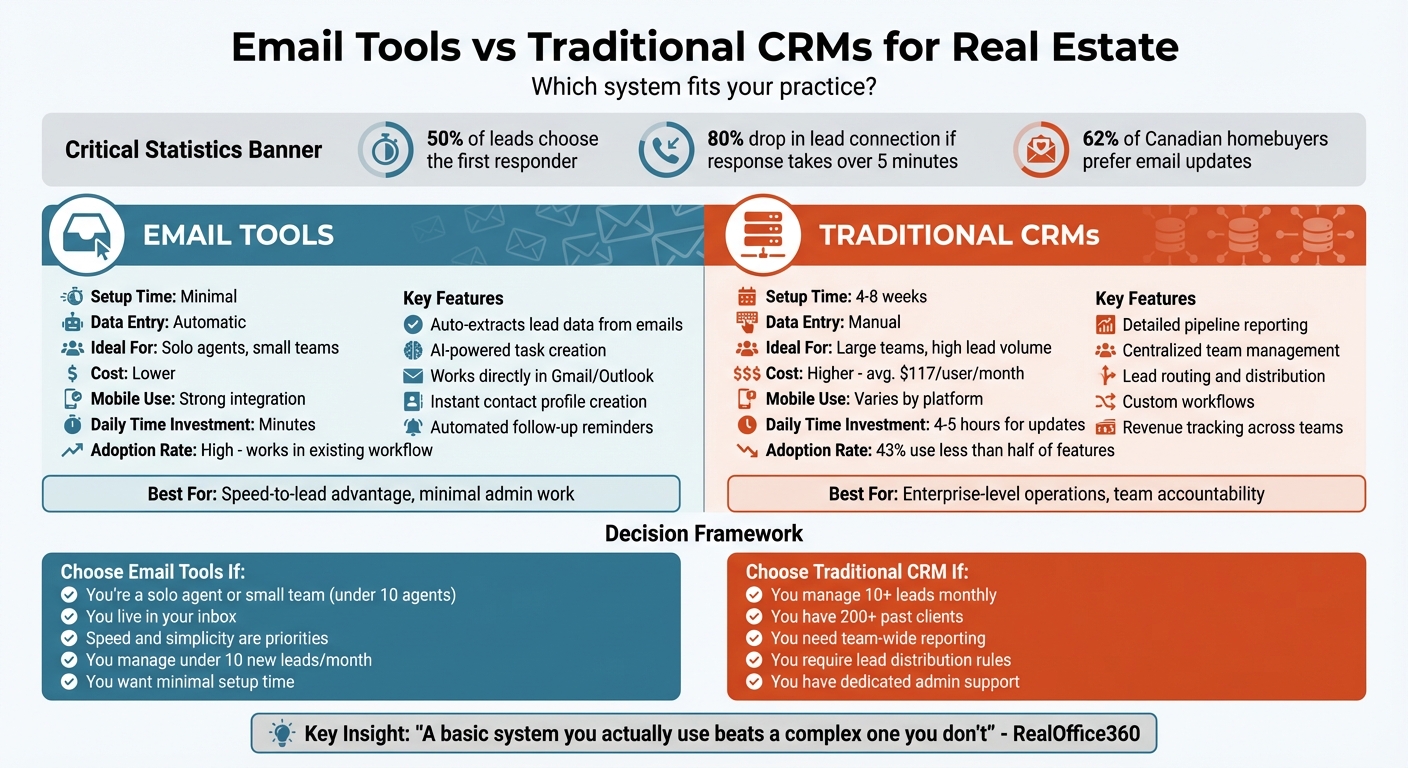
Key Differences Between Email Tools and Traditional CRMs
Email tools and traditional CRMs take very different approaches to managing client relationships. While email-driven tools work directly within your inbox, traditional CRMs operate as standalone platforms requiring manual input. Email tools automatically pull data from your inbox (like Gmail or Outlook), organizing tasks and client details seamlessly. On the other hand, traditional CRMs rely on you to manually enter contact details, log interactions, and schedule follow-ups. Let’s break down how these two systems impact daily workflows in real estate.
Email-Driven Tools: Simplifying Work from Your Inbox
Email-driven tools transform your inbox into a productivity hub. Using AI, these tools can identify tasks - such as sending contracts or booking showings - and turn them into calendar reminders without you lifting a finger. They also sync automatically with your mailbox, so when a lead emails you from platforms like Zillow or Realtor.com, their contact details, property preferences, and communication history are instantly captured and organized. This automation streamlines your workflow and helps you respond faster, a key factor in converting leads.
Traditional CRMs: Heavy on Manual Work
Traditional CRMs, on the other hand, require significant manual effort. These systems are separate platforms designed for pipeline tracking and centralized reporting, but they depend on you to input contact details, log calls or property showings, and set follow-ups. Without dedicating 4–5 hours a day to updates, these tools can quickly become outdated. Setting up a traditional CRM is also no small task - it often involves cleaning up your existing database, standardizing data, and training to ensure consistent use.
As RealOffice360 points out:
A lack of a system results in chaos... bits and pieces of contact information scattered between your email inbox, phone notepad, and a forgotten stack of business cards 7.
This administrative burden may explain why 65% of agents earning less than $35,000 annually choose to avoid CRM software altogether 3.
How Email-Based Tools Automate Client Management
Email-based tools simplify lead management by automating the process of extracting key information from lead alerts. When a new lead email arrives, these tools pull out essential details like names, phone numbers, email addresses, and property preferences. What used to take hours can now be done in just minutes, saving valuable time and allowing real estate professionals to focus on what matters most - building relationships and closing deals 10.
Automatic Client Profiles and Deal Tracking
Email intelligence platforms take client management to the next level by creating detailed profiles based on your inbox activity. Using AI-powered Smart Tagging, these tools organize messages by client name, property address, and lead status, ensuring everything is neatly categorized 5. For example, if a client emails about scheduling a showing or requesting a contract, the system picks up on the intent and automatically turns it into a task or calendar event 512.
These platforms also track transactions by updating deal stages based on client actions. For instance, if a contact opens an email or clicks a listing link, the system might move them from "Prospect" to "Active" 911. Between 2019 and 2021, Havenpark Communities used such an integrated platform to close 6,000 deals, doubling their deal volume while cutting the average time-to-close by 51% 4.
Relationship Insights Without Manual Updates
One standout feature of email-based tools is their ability to scan past communication history and uncover valuable insights. They can identify past clients who haven't been contacted in a while or flag deals that might need extra attention 136. Julia Corkey, a REALTOR® with Baird & Warner, shared her experience:
"Cloze's AI automatically flagged a past client for me to call. I reached out and he is ready to buy again... I hadn't talked to him in a long time, but Cloze surfaced him for me, and now I have a deal" 15.
These tools also provide daily briefings, offering a quick overview of active clients, new leads, deadlines, and pending follow-ups. Adam Catron, a REALTOR® with F.C. Tucker Company, explained:
"The daily agenda [isn't] just reminding you what to do, but also, '….hey, you might want to follow up on that email…' It's so helpful" 13.
In 2023, Baird & Warner reported a 36% increase in production among 450 agents using Cloze CRM, surpassing their 2021 peak despite a tough market 15.
These tools not only streamline operations but also ensure secure and compliant communication, which is especially important in Canadian real estate.
The Limitations of Traditional CRM Systems
While email-driven tools simplify client management, traditional CRMs often bring more challenges than solutions. Unlike platforms that integrate seamlessly with email to automate relationship tracking, traditional CRMs demand a lot of manual input. In fact, 43% of CRM users use less than half of the features available in their systems 18. This highlights how complexity often overshadows usability. For real estate professionals balancing showings, negotiations, and client calls, keeping up with these systems can feel like taking on a whole extra job.
Setup and Maintenance Requirements
Getting a traditional CRM up and running takes time - lots of it. The process typically involves 1–2 weeks for planning and data cleanup, 1–2 weeks for configuration and importing data, and another 2–4 weeks for training before it’s ready for daily use 7. For solo agents or small teams, this upfront time investment can be a major hurdle before seeing any benefits.
And the costs don’t stop at time. Real estate firms spend an average of $117 per user each month on CRM tools, the highest among all industries 7. But that’s just the beginning. When factoring in implementation and maintenance, enterprise MarTech systems often cost 2–3 times the initial licence fee 17. As William Flaiz, a digital transformation expert, bluntly puts it:
"Traditional CRM implementations are often expensive data graveyards filled with incomplete, inconsistent, and non-standardised information" 17.
For real estate professionals, customisation is another stumbling block. Generic CRMs aren’t built with industry-specific needs like property details, showing schedules, or due diligence workflows in mind. Tailoring these systems can cost six figures and take months, often requiring third-party consultants 16. Dealpath offers a revealing example:
"Firms often spend six figures customising Salesforce - only to return to spreadsheets for tracking IC approvals. And when adoption lags, all that customisation becomes a sunk cost" 16.
Take Avison Young, a global real estate firm with over 5,000 employees, as an example. Between 2019 and 2021, they faced a 23% CRM adoption rate across four separate systems. After consolidating into one platform over four months, they boosted adoption to 90% and tracked 95% of their North American revenue through the new system 4. However, this success came at the cost of significant organisational effort and resources - something smaller firms might not be able to afford.
Even once implemented, traditional CRMs demand constant manual upkeep, which can quickly drain productivity.
The Gap Between Adoption and Daily Use
Initial enthusiasm for CRMs often fades as agents face the reality of maintaining them. The main issue? Traditional systems rely heavily on manual input. Agents have to log every phone call, email, and showing, update deal stages, and verify contact details - all by hand.
Take email logging as an example. Manually logging a single email takes about 30 seconds. For an agent managing 50 relevant emails daily, that adds up to 25 minutes a day - or over 100 hours annually - spent on low-value admin work 19. This "administrative paralysis" pulls agents away from activities that actually generate revenue, like building relationships and closing deals.
The impact is clear. The average real estate agent loses 35% of their leads due to inconsistent follow-ups, often because of an unmaintained CRM 20. And when more than five minutes pass without responding to a lead, the chances of qualifying that lead drop by 80% 2. Time spent on data entry means missed opportunities during these critical moments.
RealOffice360 sums it up perfectly:
"A basic system that you do use is ultimately more successful than a complex one that you don't use because you become overwhelmed" 7.
When client data isn’t updated regularly, it becomes fragmented. This leads to missed follow-ups and lost referrals. Considering that 40% of buyers find their agent through a referral 8, losing touch with past clients can directly impact future business. These inefficiencies make it harder to maintain the strong client relationships that are essential for success in real estate.
Compliance and Security in Canadian Real Estate
In Canada, real estate professionals must navigate strict federal regulations to avoid hefty penalties. Whether you're using an email-driven tool or a traditional CRM, both systems need to comply with Canada's Anti-Spam Legislation (CASL) and the Personal Information Protection and Electronic Documents Act (PIPEDA). The real difference lies in how each system manages consent tracking, data security, and regulatory record-keeping on a daily basis. These distinctions shape their effectiveness in maintaining compliance.
Data Handling and Encryption
Protecting client information requires more than just strong passwords. Both email-based tools and traditional CRMs must safeguard sensitive data - like personal contact details and transaction records - through advanced security measures. Traditional CRMs often centralize this data in dedicated databases with detailed permission controls, allowing firms to limit access to specific records. On the other hand, email-driven tools rely on the security infrastructure of major providers, ensuring encrypted data transfers and secure synchronization.
Under PIPEDA, real estate professionals must follow the Fair Information Principles when collecting and using personal information 21. This means being upfront about what data is being collected, why it's needed, and how it will be used. For agents juggling large volumes of client files, choosing a system that automates these safeguards can significantly lower the risk of data breaches.
CASL Compliance
Beyond data protection, CASL compliance is critical for safeguarding your practice. CASL requires you to obtain either express or implied consent before sending any commercial electronic message (CEM). Unlike U.S. regulations, which often allow opt-out marketing, CASL enforces a strict opt-in policy. This applies to emails, text messages, instant messages, and even some social media communications.
Each CEM must include proof of consent, clear sender identification, and an easy-to-use, no-cost unsubscribe option with timely processing [38,39,42]. As the Canadian Radio-television and Telecommunications Commission (CRTC) puts it:
"The onus is on the person who claims that they have obtained consent to prove that they have such consent." 22
Traditional CRMs usually require manual updates to track consent, meaning agents must remember to log changes when clients opt out or when implied consent expires. Implied consent has specific time limits, and missing these deadlines can lead to non-compliance and fines.
Email-driven tools streamline this process by automatically tracking the date of the last interaction and flagging when implied consent is nearing expiration. These tools can also handle unsubscribe requests automatically, reducing the risk of contacting someone after their consent has expired. This automation not only ensures compliance but also helps maintain client trust.
Between October 2021 and March 2022, Canadians filed 167,939 complaints with the Spam Reporting Centre - averaging over 6,400 complaints per week 23. Automating compliance tasks not only lightens the administrative workload but also ensures that your communications remain secure and legally compliant. With this level of scrutiny, using a system that tracks consent and includes all required details in every message is essential for protecting your business.
Choosing the Right Tool for Your Practice
The best system for your real estate practice isn’t just about flashy features - it’s about how well it fits into your day-to-day workflow. A solo agent managing clients from their inbox has vastly different needs than a brokerage juggling hundreds of leads every month. Understanding how you work - and how much administrative hassle you’re willing to deal with - will help you choose a tool you’ll actually use. Let’s break down what this means for solo agents and small teams versus larger operations.
For Solo Agents and Small Teams
If you’re running the show solo, the last thing you need is a CRM that adds more work to your plate. Many traditional systems require you to log every email manually, which quickly turns into a time-consuming chore instead of a helpful tool.
Speed matters. If you don’t reach out to a lead within five minutes, your chance of connecting and qualifying them plummets by 80% 2. Even more striking, half of all leads go with the first company that contacts them 2. That’s where automation comes in. Email-driven tools can automatically log conversations, saving you the effort of copying and pasting details into a CRM. This kind of system ensures every interaction is captured while allowing you to focus on building relationships. Plus, since over 60% of real estate emails are opened on mobile devices 4, you’ll want a tool with strong mobile synchronization - perfect for those days when your car doubles as your office 195.
Before committing to any system, take a moment to jot down your most tedious tasks - whether it’s follow-ups, marketing, or client check-ins. This will help you pinpoint the specific features you need 4. Opt for solutions with native Gmail or Outlook integrations, as these tend to be more reliable than third-party connectors like Zapier, which can sometimes break during updates 19. Test the system’s integration by asking yourself: Can I view a client’s full profile and transaction history without leaving my inbox? As Agent AI puts it:
"For a real estate agent, the inbox is the central nervous system of their business. Every contract, negotiation, client instruction, and lead inquiry passes through Gmail or Outlook."
– Agent AI 19
For Larger Teams and Centralised Management
While solo agents thrive on simple, automated tools, larger teams need more robust systems to handle their volume of leads and clients. If your team manages more than 10 leads a month or has a database of over 200 past clients, a traditional CRM is likely the way to go 24. These platforms offer features like centralised reporting, lead routing, and accountability measures that email-driven tools can’t match at scale.
For high-volume operations, lead distribution is key. Traditional CRMs can automatically assign leads based on criteria like postal code, price range, or agent expertise, ensuring inquiries are handled by the right person right away 24. Some teams also use "pond" strategies, where unclaimed leads are pooled for any agent to pick up, helping maximize ROI 24.
A great example of how centralised systems can transform operations is Avison Young. Between June and October 2025, this global real estate adviser merged four separate CRM systems into one platform. The result? CRM adoption among their 5,000+ employees skyrocketed from 23% to 90% in just four months. This change allowed them to track 95% of their North American revenue on a single system 4. Centralised systems like these provide real visibility and accountability, going far beyond just being a glorified contact list.
The time it takes to implement these tools also varies. Individual agents can typically get up to speed in one to two weeks, but larger brokerage-level platforms may require four to eight weeks for full adoption 24. While email-driven tools involve minimal upkeep, traditional CRMs demand more structured onboarding and training. Make sure the system’s mobile app is just as functional as its desktop version - agents in the field won’t use a tool that only works at the office 2419. For teams of 10 or more, look for admin panels that allow rule sharing and restrict full database exports for added security 14.
Traditional CRMs often require a “power user” or dedicated training sessions to keep adoption consistent 124. Without this, the system risks becoming little more than a fancy contact list. As Salesforce explains, a well-implemented CRM:
"turns data into easily accessible insights and empowers everyone in the organisation to grow relationships, identify operational efficiencies, [and] find new sales opportunities"
– Salesforce 1
But that’s only possible if the team uses it consistently.
Conclusion
Pick the tool that aligns best with how you work. If you're a solo agent spending most of your time in Gmail or Outlook, an email-based tool that automatically logs conversations and creates follow-up tasks might be your best bet. It can save you time compared to a more complex CRM packed with features you may never use. But if you're part of a larger team managing intricate pipelines, the reporting and lead routing capabilities of traditional CRMs become indispensable.
Quick responses can make or break success. Email-focused tools excel in delivering that speed-to-lead advantage, while traditional CRMs show their strength in unifying systems for comprehensive revenue tracking. For instance, Avison Young streamlined its operations by consolidating four systems into one, highlighting the power of centralisation 4. These examples emphasize the importance of choosing a system that tackles your specific challenges.
Take a close look at your daily routine. Are slow follow-ups or messy files holding you back? Automated tools can take care of repetitive tasks like manual data entry, giving you more time to focus on building connections. Think about what’s slowing you down and let that guide your decision. As Navigator Multimedia wisely notes:
"The perfect CRM doesn't exist… but the perfect CRM for you absolutely does. It's the one that feels less like a chore and more like a trusted assistant working behind the scenes."
– Navigator Multimedia 25
Look for tools with smooth email integration and strong mobile capabilities. A system that fits seamlessly into your workflow and is easy to use will always deliver better results than one that sits unused on your desktop.
FAQs
Tags
Ready to fix follow-up?
Try inbox-first relationship management free for 14 days. No credit card required.
Start Free Trial