
Table of Contents
How to Maintain Personal Connections in Real Estate Follow-Ups
Personalized, timely follow-ups—powered by smart automation—turn past clients into repeat business and top referral sources.

How to Maintain Personal Connections in Real Estate Follow-Ups
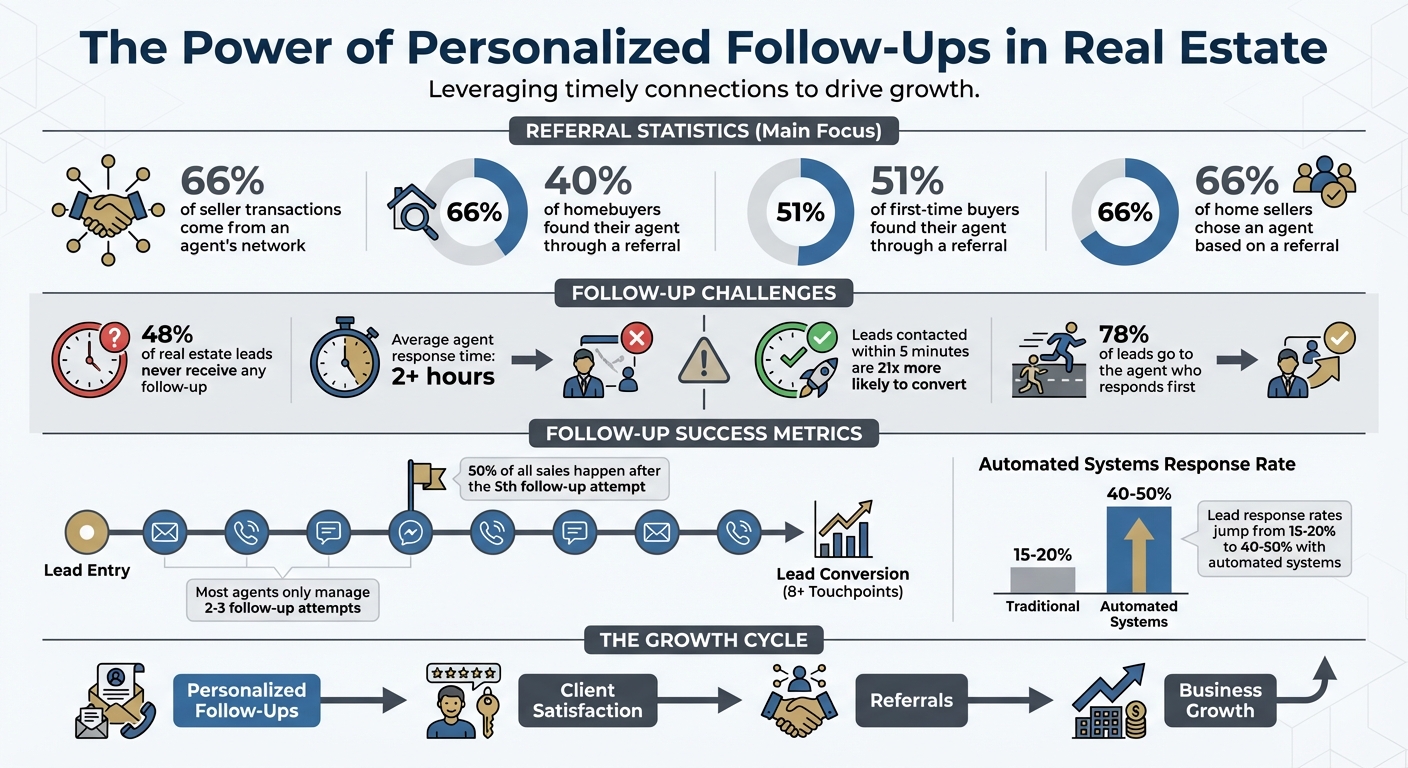
Building strong relationships is key to success in real estate. Here’s the bottom line: personalized follow-ups drive repeat business and referrals. While 66% of seller transactions come from an agent's network, many agents lose touch after closing deals, missing out on future opportunities. Automation can help, but generic messages often feel cold and transactional. The solution? Combine smart automation with personal touches to keep communication meaningful.
Key Takeaways:
- Personalization is critical: Reference past conversations, client preferences, or milestones like home anniversaries to make follow-ups feel genuine.
- Use smarter automation: Tools that track email interactions can suggest timely, relevant follow-ups without adding extra work.
- Timing matters: Automated reminders for key events (e.g., home anniversaries, high engagement) ensure you stay connected at the right moments.
- Referrals depend on trust: Thoughtful follow-ups make clients more likely to recommend you to friends and family.
By blending automation with personal effort, you can build lasting client relationships, increase referrals, and grow your business efficiently.
Instead of THIS, say THAT - Real Estate Follow Up Scripts | #MarketAuthorityShow
How to Write Personalized Email Follow-Ups
Personalized follow-ups are a great way to show clients that they’re more than just another name in your database. By referencing specific details from past interactions - like the 200 sq. m. bungalow in Kitsilano they toured or their concerns about the roof - you demonstrate that you’ve been paying attention. It’s this personal touch that transforms a generic email into a meaningful conversation.
A helpful way to remember what matters most to a client is the FORD acronym: Family, Occupation, Recreation, and Dreams 8. For instance, did they mention their daughter’s soccer season during your last meeting? Or share their plans to downsize after retirement in two years? Incorporating these personal details into your emails makes your follow-ups feel less like transactions and more like genuine connections. Let’s break down how to weave in personal touches, use AI tools effectively, and strike the right balance between manual and automated communication.
Reference Past Conversations and Details
Before writing a follow-up, take a few minutes to review your email history or notes. Look for specific dates, property features, or locations you’ve discussed. For example, instead of sending a generic message like, “Hope you’re still interested in finding a home,” you could write:
"On Jan. 15, you mentioned wanting a kitchen with an island. There’s a new 180 sq. m. listing in Beltline with that exact feature, priced at $625,000 CAD."
This level of specificity shows clients you’re not just reaching out for the sake of it - you’re genuinely invested in their search.
Another tip? Log feedback immediately after property tours so you can reference likes and dislikes later 56. If a client loved the hardwood floors but wasn’t a fan of the narrow hallway in a previous showing, bring that up when sharing a new listing. Adding hyper-local insights, like recent sales trends or appreciation rates in their preferred neighbourhood, can make your emails even more relevant 5. The goal is to ensure every message feels tailored to them, not like a copy-paste job.
Use AI Drafts as Starting Points
AI tools can save you time by generating email drafts, but they’re just a starting point. Be clear about your desired tone - whether warm and professional or casual and friendly - and let the AI create a base for you to refine 911. From there, add personal touches the AI might miss, like congratulating a client on their recent job promotion or answering a specific question they asked during your last call 102.
"AI can make you faster. But being thoughtful still makes you better" 12.
It’s also essential to fact-check any market data or legal information included in AI-generated drafts, as these tools can occasionally produce outdated or inaccurate details 9. And remember: never input sensitive client information into AI prompts, as some platforms may store or process that data 9. By combining AI efficiency with your personal insights, you can craft emails that both save time and resonate with clients.
Manual vs. Automated Personalization
Both manual and automated approaches have their strengths, and knowing when to use each can make all the difference. Manual personalization allows for rich detail and authenticity, but it’s time-consuming. On the other hand, automation can handle large volumes of emails but risks feeling impersonal if not carefully edited. A hybrid approach often works best: let automated tools handle the basics - like timing and merge fields - but take a moment to add a personal touch, such as a “P.S.” about a shared interest or local event 713.
Here’s a quick comparison of the two approaches:
| Feature | Manual Personalization | Automated Personalization |
|---|---|---|
| Time Investment | High (10–15 minutes per email) | Low (set once, runs continuously) |
| Level of Detail | Specific anecdotes, FORD details | General details (e.g., price, area) |
| Authenticity | High | Moderate (requires editing) |
| Potential for Mistakes | Low | Higher (e.g., incorrect merge data) |
| Scalability | Limited (time-intensive) | High (handles large volumes) |
This blend of automation and personal effort ensures your emails feel thoughtful without overwhelming your schedule. By combining the strengths of both methods, you can connect with clients in a way that feels genuine while staying efficient.
Create Client Profiles That Update Automatically
Keeping track of client details manually can feel like an endless chore. Thankfully, inbox-driven tools can take the load off by scanning your emails and automatically updating client profiles. These tools capture important dates - like closing dates, birthdays, and home purchase anniversaries - turning profiles into living records of key milestones.
Say goodbye to tedious note-taking. These tools analyse email conversations to extract context, such as a client’s buying readiness or repeated interest in a specific property. Profiles are then automatically tagged for follow-up 15. This means you’ll always have the information you need to stay on top of what matters most to each client, without the hassle of managing it yourself.
Track Client Events from Email Data
Inbox intelligence tools use AI to sift through your incoming emails and attachments, like PDFs from lawyers or lenders, to identify specific details. They can pick out closing dates from transaction emails, move-in dates from lease agreements, or even personal touchpoints like birthdays mentioned in casual exchanges. These dates are then used to calculate anniversaries or schedule reminders for seasonal check-ins.
The system also tracks behavioural data, such as how often a client views a particular property or opens your emails 614. For example, if a client clicks on a listing three times in one week, the tool flags this as a strong signal of interest. These real-time insights ensure your follow-ups are timely and relevant, rather than feeling random or out of sync.
To make things even easier, the system can trigger automated reminders, helping you reach out at just the right moment.
Set Up Reminders for Follow-Up Timing
Automated reminders take the guesswork out of follow-ups, ensuring you connect with clients at the ideal time without relying on memory or manual scheduling. These reminders are triggered by specific events - like a home anniversary or a period of inactivity - and often come with sample message ideas to make your outreach feel personal and thoughtful.
| Reminder Type | Trigger | Sample Message Idea |
|---|---|---|
| Home Anniversary | 1 year since closing date | "Happy home anniversary! Would you like a complimentary updated valuation?" 614 |
| High Engagement | Client views a listing 3+ times | "I noticed you've been looking at [Address]. Would you like to schedule a private tour this weekend?" 615 |
| Re-engagement | No interaction for 30+ days | "I noticed we haven't connected in a while. Has your search criteria or timeline changed?" 615 |
| New Listing Alert | New property matches saved criteria | "A new [X-bedroom] home just listed in [Neighbourhood] that fits your search perfectly." 15 |
| Seasonal Check-in | Change of season (Spring/Fall) | "As we head into winter, here's a quick checklist for winterising your home in [Neighbourhood]." 14 |
These reminders are more than just time-savers - they help you stay connected with clients in a way that feels natural and meaningful. By automating the timing, you can focus on crafting messages that truly resonate, while staying top-of-mind with your clients.
Generate Referrals Through Better Follow-Ups
Referrals are the lifeblood of real estate. According to the 2024 NAR Profile of Homebuyers and Sellers, 40% of homebuyers found their agent through a referral from someone they know - a friend, neighbour, or relative 3. For first-time buyers, that percentage climbs to 51% 3. On the selling side, the stats are even more striking: 66% of home sellers chose an agent based on a referral 3. Yet, many agents find it tricky to ask for referrals in a way that feels natural and not overly pushy.
The key? Timing and personalization. By reviewing your email history, you can identify the perfect moments to reconnect and craft outreach that feels genuine. This approach transforms happy clients into your strongest advocates without sounding rehearsed or transactional. Let’s break it down.
Use Email History to Reconnect at the Right Time
Your email history is a goldmine for spotting opportunities to reach out. Look for mentions of personal milestones - like graduations, weddings, new babies, or even quirky ones like a pet’s birthday. These moments are perfect for sending a thoughtful message that shows you care about your clients beyond just the business side of things 174.
Transaction anniversaries are another natural touchpoint. Reaching out on the anniversary of their home purchase gives you a chance to check in, share helpful updates, and subtly ask for referrals 243. Past conversations can also reveal plans for renovations or repairs - offering to connect them with a trusted contractor at the right time shows you’re still invested in their success 177.
Local market updates can also spark meaningful conversations. Use property details from previous emails to share insights, like rising home values in their neighbourhood or a dip in interest rates that could benefit them 171. If they’ve referred someone to you before, your email history can help you track that connection, allowing you to follow up with a progress update and a heartfelt thank you 172.
"It's all about making it personal, making it magic, and making the experience unforgettable so that two or 10 years down the road they'll remember to call you." - Cheryl Hanna, Real Estate Professional, Keyes Co. 4
Always aim to offer something of value when you reach out. For example, you might provide a mini Comparative Market Analysis (CMA) or share a curated list of reliable local vendors, like plumbers or electricians 1741. Tax season is another smart opportunity - use your email history to identify clients who closed in the previous year and send them their closing statements or statement of adjustments in January to help with their taxes 4. These thoughtful touches make your outreach feel timely and useful, setting the stage for natural and effective referral requests.
Keep Referral Requests Personal
Generic, automated templates can fall flat. The best referral requests feel like a natural continuation of your relationship, not a sales pitch. To avoid sounding impersonal, take a moment to tweak automated drafts so they reflect the client’s unique experience with you 3.
Start by adding a personal touch to the opening line. Reference something specific from your past conversations to show that you value the relationship beyond the transaction 718. This small effort can turn a routine request into an engaging dialogue. Personalized follow-ups like these build trust and strengthen connections over time.
"Personalization is the skill that transforms standard follow-ups into meaningful touchpoints, allowing you to build trust, deepen relationships, and ultimately grow your business." - Mark Hughes, Real Estate Coach 16
Timing is just as crucial as personalization. The best time to ask for a referral is shortly after a successful transaction or during a significant client milestone 166. Instead of simply asking for business, position yourself as a resource. Share market updates or recommend vendors they might need 119. You can also build goodwill by supporting their own business or side hustle - this often encourages them to return the favour by referring you 1.
When it’s time to make the ask, keep it simple. Suggest they share your contact information with someone they know or provide a name, keeping the process easy and stress-free 3. Remind them of your past success by mentioning specific details of your work together, reinforcing the value you bring 1619. This approach, rooted in thoughtful communication and timing, helps turn your inbox into a powerful tool for growing your referral network.
Why Inbox Intelligence Works Better Than Manual CRM
Real estate agents often aim to stay on top of every client interaction - logging details, updating notes, and setting reminders for follow-ups. But here’s the catch: 48% of real estate leads never receive any follow-up at all 15. It’s not for lack of trying; the problem lies in the sheer time manual systems demand. Between showings, paperwork, and negotiations, there’s just not enough time in the day.
Traditional CRM systems can actually cause more headaches than they solve. Industry experts point out that these systems often lead to errors from inefficient multitasking 21. When agents are swamped with current clients, new leads can fall through the cracks. On the flip side, focusing on prospecting can mean neglecting existing relationships. And let’s not forget the time sink of manual data entry - logging every single interaction becomes a major roadblock 6. This is where inbox-driven solutions step in to save the day.
Problems with Manual CRM Systems
Manual CRMs are notorious for wasting time. After every showing, phone call, or email, agents have to stop what they’re doing to update the system 6. This eats into time that could be spent building connections or closing deals.
There’s also the issue of response times. On average, agents take over two hours to respond to a new lead. Yet, research shows that leads contacted within five minutes are 21 times more likely to convert. In fact, 78% of real estate leads go to the agent who responds first 15. These delays don’t just slow down engagement - they can cost you promising leads. And while converting a lead typically takes more than eight touchpoints over weeks or months, most agents only manage two or three follow-up attempts before running out of time 15.
How Inbox-Driven Tools Simplify Client Management
Inbox-driven tools offer a smarter, faster way to handle follow-ups. These tools integrate directly with your email - where you’re already spending much of your time. Instead of requiring manual updates, they automatically analyse your email activity to track interaction history, spot engagement patterns, and surface opportunities - all without you lifting a finger 20.
This automation transforms response times. While manual systems leave agents averaging a two-hour delay, inbox-driven tools can trigger responses within minutes, 24/7 15. They also monitor engagement signals like email opens and clicks, helping you zero in on leads who are actively interested. For example, if a lead mentions they’re "ready to buy now" or asks about making an offer, the system sends you an instant mobile notification, so you can act at the perfect moment 15.
"Automated systems are consistent, predictable, and always on." – FlowUp 21
Perhaps the biggest advantage? Inbox-driven tools ensure consistency, even when you’re swamped. They can nurture countless leads simultaneously, handling those crucial follow-ups automatically while you focus on sealing the deal in person. Agents using these systems often see lead response rates jump from 15–20% to 40–50% 15. Why? Because no lead gets overlooked, and every client feels valued. Faster responses mean stronger relationships - and more closed deals.
Conclusion
Staying connected in real estate doesn't mean you have to choose between technology and genuine relationships. The most effective agents understand that while automation handles when to reach out, it's personalization that determines how to connect 36. By using tools that track client interactions, you can focus on crafting messages that truly matter - whether that means referencing a past conversation, celebrating a milestone, or sharing meaningful insights instead of generic updates. This thoughtful mix of technology and human touch not only enhances your communication but also sets the stage for valuable client referrals.
The value of referrals is undeniable - statistics prove that consistent, personalized follow-ups turn satisfied clients into enthusiastic advocates 3. These referrals stem from the kind of attention that makes clients feel appreciated long after the deal is closed. With email intelligence, you can identify the perfect moments to reach out, ensuring you're not just remembered, but trusted as an adviser.
Here’s a key takeaway: half of all sales happen after the fifth follow-up attempt 7. Tools that automate follow-ups help you avoid missed opportunities, allowing you to focus on building meaningful relationships. Start by organizing your database, adding a personal touch to each interaction, and letting automation handle the timing. When clients feel your genuine care, they’re more likely to return the favour with referrals, becoming the cornerstone of your long-term success.
FAQs
Tags
Ready to fix follow-up?
Try inbox-first relationship management free for 14 days. No credit card required.
Start Free Trial