
Table of Contents
How To Time Emails For Client Reconnects
Boost reconnect rates by timing emails: send midweek mornings, adjust for time zones, personalise content, and use AI-driven follow-ups.

How To Time Emails For Client Reconnects
When sending emails to reconnect with clients, timing is everything. Here's what you need to know:
- Best Days: Send emails midweek, especially on Tuesdays and Thursdays, for higher engagement. Avoid Mondays (inbox overload) and Friday afternoons (weekend focus).
- Ideal Times: Target mornings between 9:00 AM and 11:00 AM in the recipient's local time. Early mornings (5:00 AM to 8:00 AM) can also boost reply rates by 25%.
- Business vs. Personal Clients: Business contacts respond well during work hours, while personal clients engage more during evenings or weekends.
- Time Zones: Adjust for Canada’s six time zones to ensure your emails land at the right moment.
- Follow-Ups: Sending two follow-up emails instead of one can increase response rates by 46%, highlighting how often you should follow up to maintain engagement.
Use data and AI tools to refine your timing further, ensuring your emails reach clients when they’re most likely to engage. This approach respects their time and increases your chances of staying top-of-mind.
How to Find the Perfect Day and Time to Send Your Emails
Best Times and Days to Send Reconnect Emails
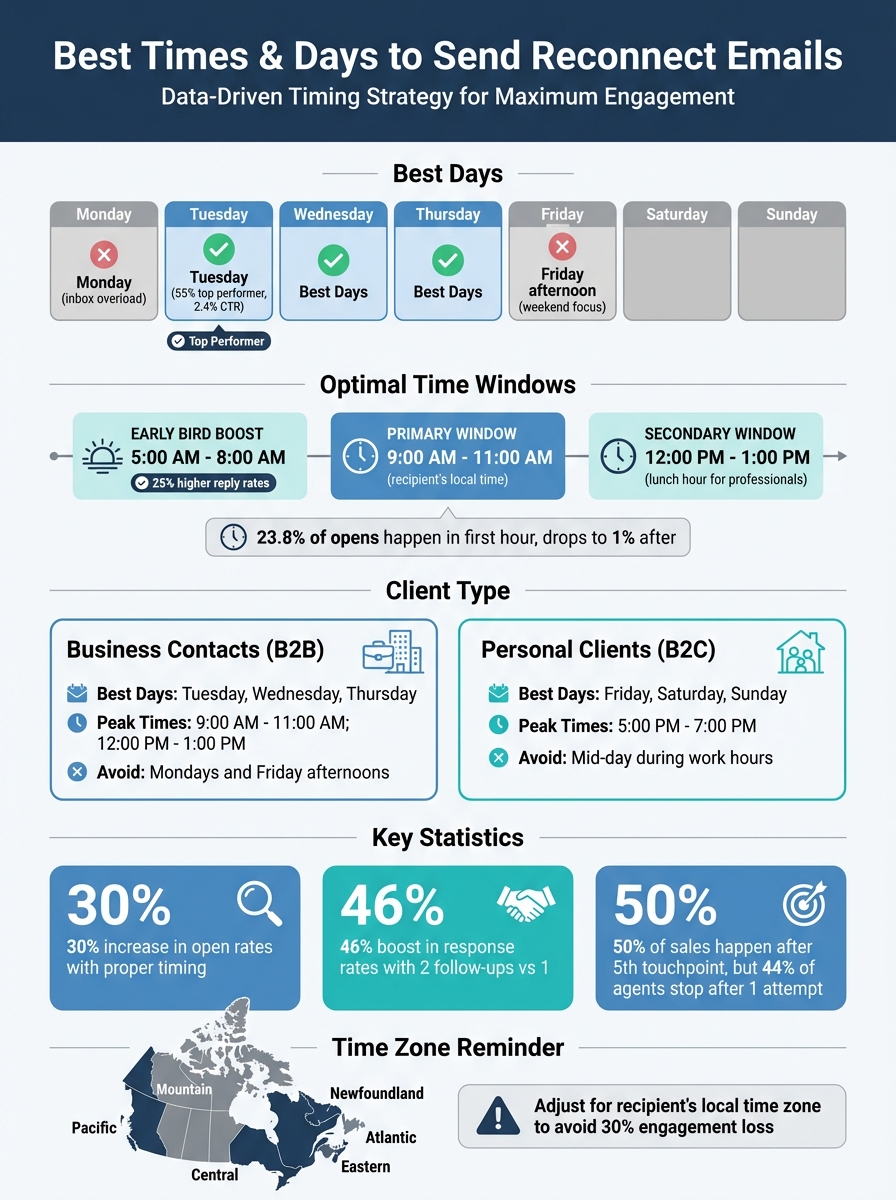
When it comes to reconnect emails, timing is everything, and having a realtor follow-up checklist ensures you never miss a beat. Research shows that the sweet spot for sending these emails is midweek - Tuesday through Thursday. In fact, Tuesday stands out as the top performer, with 55% of email studies naming it the best day for outreach. It also boasts the highest click-through rate at 2.4% 1115. Thursday isn’t far behind, as it catches recipients when they’re starting to think about their weekend plans 7. The best time to send? Between 9:00 AM and 11:00 AM in the recipient’s local time zone, right before their day gets too busy. Interestingly, sending emails earlier in the morning - between 5:00 AM and 8:00 AM - can boost reply rates by 25%, as many Canadians check their phones first thing in the morning 141511.
On the flip side, avoid Mondays and Fridays. Monday inboxes are often flooded with weekend emails, making it harder for your message to stand out. By Friday afternoon, people are mentally checked out, focusing on the weekend instead of their emails 810. Timing is crucial - about 23.8% of all email opens happen within the first hour of delivery, and after that, the chances of an open drop to just 1% 12. Sending emails at the right moment can increase open rates by up to 30% 11, helping you make a stronger impression as a thoughtful and considerate communicator.
Let’s dive into how timing strategies can vary depending on your audience.
Business vs. Personal Client Timing
Different types of clients respond best at different times. For business contacts - like agents, brokers, or property managers - emails sent from Tuesday to Thursday in the morning (9:00 AM to 11:00 AM) tend to perform the best 1410. There’s also a secondary window during lunch hours (12:00 PM to 1:00 PM), when professionals often check their emails 1410.
For individual homebuyers and sellers, the approach is different. These clients are more likely to engage during their personal downtime, such as evenings between 5:00 PM and 7:00 PM. Weekends, especially Friday afternoons through Sunday, also work well 1410. While Saturdays can see high open rates among entrepreneurial clients, click-through rates often lag behind midweek numbers 912.
| Client Type | Optimal Days | Peak Time Slots | Days to Avoid |
|---|---|---|---|
| Business Contacts (B2B) | Tuesday, Wednesday, Thursday 714 | 9:00 AM – 11:00 AM; 12:00 PM – 1:00 PM 1410 | Mondays and Friday afternoons 1410 |
| Personal Clients (B2C) | Friday, Saturday, Sunday 1410 | 5:00 PM – 7:00 PM 15 | Mid-day during work hours 14 |
Now, let’s consider how to adjust for Canada’s diverse time zones.
Adjusting for Time Zones Across Canada
Canada’s vast geography means dealing with six time zones, from Newfoundland Standard Time to Pacific Standard Time. A 9:00 AM email sent from Halifax will hit inboxes in Vancouver at 5:00 AM, likely getting buried under other early-morning notifications 10. To ensure your email lands at the right time, segment your list by region and schedule sends to align with each recipient’s local time zone 1410.
For example, if you’re reaching out to clients in Ontario and British Columbia, you could schedule emails for 10:00 AM EST for Toronto contacts and 10:00 AM PST for Vancouver contacts. Tools like Salesforce Marketing Cloud or Rechat make it easy to automate these time zone-specific sends 1314. Without this adjustment, you could lose up to 30% of potential engagement simply because your timing didn’t match the recipient’s daily routine 11.
Using Tools and Data to Improve Email Timing
Gone are the days of relying on generic email timing rules like "Tuesday at 10:00 AM." With the help of analytics and AI, you can now pinpoint the exact moments your audience is most likely to engage. Instead of guessing, you can rely on data to identify patterns specific to your audience - like a Vancouver homebuyer who checks emails during their evening commute or a Toronto business contact who prefers midday breaks.
It's not just about open rates anymore. Metrics like Click-Through Rate (CTR) and Click-to-Open Rate (CTOR) offer a deeper understanding of engagement, especially with privacy measures that can skew open rate stats 1516. For real estate professionals, a 35–40% open rate is strong, but the real value lies in knowing when these opens occur and what actions follow.
Finding Patterns in Your Email Analytics
Your email analytics hold the key to uncovering each client's "golden window." By segmenting your audience based on past behaviour, you can identify patterns - some clients might engage between 9:00 AM and 11:00 AM, while others are more active in the afternoon, between 2:00 PM and 4:00 PM 1518. This approach caters to clients who might miss morning emails due to meetings or other commitments.
Client actions, like property searches or purchase anniversaries, also provide valuable timing cues. Trigger-based emails, such as those sent after a significant client action, can achieve open rates that are 50–70% higher than standard scheduled campaigns 4. For instance, if a lead has been inactive for 90 days, it’s a perfect opportunity to send a re-engagement email 20. Moving away from rigid schedules to behaviour-driven email sequences ensures your messages reach clients at the most receptive times.
While segmentation helps uncover timing patterns, automation takes it a step further by making the process seamless.
AI Tools That Optimize Send Times
AI tools like KivoAI bring precision to email timing by analysing past engagement patterns. These platforms predict the best time to send emails for each recipient, lifting engagement by 38% compared to traditional batch-sending methods 4. It’s no surprise that 39% of email marketing teams now use AI to optimise send times 15.
"The best time to email has shifted from 'Tuesday at 10 AM' to 'when this specific prospect is most receptive.'" – RealScout Academy 4
The gap between manual scheduling and AI-driven optimisation is striking. Manual methods rely on static schedules and require constant monitoring, while AI tools dynamically adjust to client behaviour and local time zones. By targeting quieter, high-intent moments, AI can boost open rates by 35–50% 17. Tools like KivoAI also identify timely opportunities - like anniversaries or milestones - ensuring your emails are not only sent at the right time but also for the right reasons. This approach strengthens client relationships and keeps your communications relevant.
| Feature | Manual Scheduling | AI-Driven Optimisation (e.g., KivoAI) |
|---|---|---|
| Basis for Timing | Relies on general benchmarks (e.g., "Tuesdays at 10:00 AM") 15 | Uses individual historical engagement data 4 |
| Time Zone Handling | Requires manual segmentation by time zone 15 | Automatically adjusts delivery based on the recipient's local time 211 |
| Adaptability | Static; changes require manual updates | Dynamic; continuously learns from real-time data 15 |
| Engagement Impact | May suffer from inbox clutter during peak hours | Can improve open rates by 35–50% by targeting quieter, high-intent windows 17 |
| Effort Level | High; requires ongoing monitoring and manual adjustments | Low; automates the scheduling process |
How to Schedule Reconnect Emails Step-by-Step
Here’s a guide to crafting and scheduling reconnect emails that encourage responses.
Writing a Personalised Reconnect Email
Start by reintroducing yourself with relevant context. Even if you’ve worked with the client before, referencing specific details like a property or neighbourhood helps jog their memory. For instance:
"Hi Sarah, it’s Alex from Maple Realty - we worked together on your townhouse purchase in Leslieville back in March 2024."
Acknowledge the gap in communication with a brief apology. This helps ease any awkwardness and shows your intention to maintain the relationship moving forward. Then, focus on offering value. The key is to reach out only when you have something meaningful to share - this could be a market update for their area, a referral to a reliable contractor, or even a free home appraisal.
"The golden rule is to only contact clients when you have something of value to offer. If you're annoying or pushy, they'll be less likely to refer future customers to you." – Zillow 3
Consider including milestones like home purchase anniversaries or birthdays. These moments are natural touchpoints. For example, research indicates that 73% of sellers undertake at least one home improvement before listing, making contractor referrals during Q1 especially relevant 3. When requesting referrals, shift the focus to how your services will benefit the person being referred, rather than centring on your own business needs.
Use this opportunity to update their contact details. Confirming their current email and phone number ensures smoother communication in the future. It’s worth noting that the average real estate agent loses over 20% of their clients annually simply because they fail to stay in touch 22.
Once your personalised message is ready, follow these steps to schedule your reconnect emails effectively.
Setting Up Your Email Schedule
Start by segmenting your clients into categories - buyers, sellers, past clients, and cold leads - using your CRM. Tailored messaging for each group ensures relevance 256. When planning your schedule, aim for quarterly touchpoints for past clients who aren’t actively in the market, supplemented by milestone emails like home anniversaries or birthdays 24.
If you’re not using AI tools like KivoAI to optimise send times, stick to reliable timing strategies. Tuesdays between 9:00 AM and 3:00 PM EST are often effective 5. For Q1 outreach, avoid sending emails on 1 January, as inboxes are typically flooded with "Happy New Year" messages. Instead, aim for mid-to-late January 24.
Leverage behaviour-triggered emails for better engagement. These are sent based on specific actions, such as a client browsing properties or visiting your website. Such emails can see open rates 50% to 70% higher than traditional campaigns 4.
Set up conditional rules for follow-ups: if there’s no reply, send a follow-up after three days and stop once the client responds. Limit follow-ups to three messages, as even one follow-up can boost response rates by 22% 2023.
Here’s a quick summary of timing and personalisation tips for different email types:
| Email Type | Recommended Timing | Key Personalisation Element |
|---|---|---|
| Prospect Outreach | Tuesdays, 9:00 AM – 3:00 PM EST | Reference local postal code or neighbourhood 5 |
| Client Follow-up | Within 24 hours of interaction | Reference specific details from the meeting/showing 195 |
| Home Anniversary | Annually on closing date | Mention their specific home or neighbourhood 19 |
| Market Update | Monthly or Quarterly | Include hyper-local data (median price, days on market) 19 |
Platforms like KivoAI can simplify this process by automating personalised email scheduling. It can identify opportunities like home anniversaries or milestones and even draft emails based on past interactions.
Tracking Results and Improving Your Timing
Metrics to Monitor
Start by keeping a close eye on your open rates. For real estate emails, a healthy open rate falls between 35% and 40% 16. Other key metrics include click-through rates (CTR), which should land between 2% and 5%, a bounce rate below 2%, and an unsubscribe rate under 0.5%. If those last two numbers start creeping up, it might mean you're either sending too many emails or targeting the wrong audience 16.
Spam complaint rates are another important factor. Ideally, these should stay below 0.1% - anything over 0.3% could trigger warnings from providers like Gmail or Yahoo 18. For conversion rates, aim for 1% to 3% on high-value actions, like booking a consultation, and 4% to 5% for simpler tasks, such as downloading a buyer's guide 16.
"Your open rate is the first sign of whether your email marketing is working. If people aren't opening your emails, they're never going to engage with your listings, market updates, or calls to action." – realtor.com® PRO 16
If your numbers are falling short, tweak your send times or experiment with new subject lines. These small adjustments can make a big difference in engagement.
Adjusting Your Approach Based on Data
Using insights from your metrics, refine your email strategy to focus on what works best. Instead of sticking to a rigid calendar, consider switching to behaviour-triggered emails. For example, if a client browses properties on your website or starts a search, follow up within 24 hours 174. Behaviour-triggered emails often outperform standard campaigns, boasting open rates 50% to 70% higher 4.
For inactive clients - those who haven’t engaged in 30 to 60 days - cut your email frequency in half. If they remain unresponsive for 90 days or more, send a final re-engagement email. If that doesn’t work, it’s better to remove them from your list to maintain your sender reputation 21.
A/B testing is another way to optimize your timing. Test one variable at a time, like the day or hour of your email, to see what resonates best 17. Some agents find that Sunday evenings around 8:00 PM work well, as inboxes are less crowded at that time 18. Alternatively, tools like KivoAI can take the guesswork out by learning when individual clients are most likely to engage, potentially boosting open rates by 35% to 50% compared to traditional batch sends 17.
If emails aren’t generating responses after three attempts, try switching gears. Make a phone call or send a LinkedIn message instead of continuing to email. It’s worth noting that 50% of sales happen after the fifth touchpoint, yet nearly half of agents give up after just one attempt 26. Persistence, combined with a multi-channel strategy, can make all the difference.
Conclusion
Getting the timing right with your emails helps build trust and keeps you on a client’s radar, even if they’re not ready to make a move right away. Responding to a new lead within five minutes shows you’re proactive and attentive - qualities that can set you apart as a professional 1. Regular follow-ups, on the other hand, show the persistence and reliability clients value when making one of their biggest financial decisions. These factors underline why fine-tuning your email timing strategy is so important.
Here’s a striking statistic: only 2% of sales happen on the first contact, while 50% occur after the fifth follow-up. Yet, 44% of agents stop after just one attempt 262. This shows how critical it is to combine well-timed outreach with consistent follow-ups. Behaviour-triggered emails - sent when clients are actively browsing or searching - are especially effective, achieving 50–70% higher open rates than generic batch emails 4.
Tools like KivoAI take the guesswork out of timing. By analysing email interactions, these tools identify the best moments to reconnect with clients, saving you from manually figuring it out. Instead of blindly reaching out, you’ll know exactly which clients are ready to engage and when they’re most likely to respond. This kind of insight ensures your emails are not just timely but also targeted and meaningful.
Ultimately, sending emails at the right time respects your clients’ space while keeping you top-of-mind when they’re ready to act. With the right tools and strategies, you can nurture relationships effortlessly, turn past clients into loyal advocates, and ensure no lead falls through the cracks.
FAQs
Tags
Ready to fix follow-up?
Try inbox-first relationship management free for 14 days. No credit card required.
Start Free Trial